Showing posts with label Visual Studio 2008. Show all posts

Thursday, November 06, 2008

Resolved: Installing Silver Tools Beta 2 with Visual Studio 2008 SP1

If you have Visual Studio 2008 SP1 installed and you are attempting to install Silverlight Tools Beta 2 (silverlight_chainer.exe), you may have run into the following error:
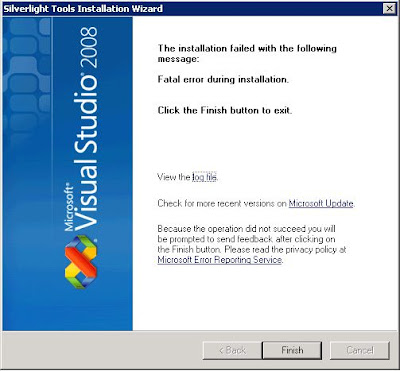
The installation failed with the following message: Fatal error during installation. Click the Finish button to exist.


If you open the log file and scroll to the bottom, you may find an error similar to this:

Original exit code: c:\a50aad885dc5172be00e9656bfb3\Silverlight.2.0_Developer.exe returned non-MSI error code: 0x5de - The event log file is full.

If you attempt to run that executable, you will likely get an error that a newer version already exists. The interesting part is this executable is trying to install the "developer" version of Sliverlight (which allows for debugging as I understand).

I went to Control Panel --> Add or Remove Programs and removed Silverlight. I then ran that executable again and voila, it worked.

I then ran the silverlight_chainer.exe again.

Surprise surprise! It worked!

--------------

I just found out that there is a Silverlight release for Visual Studio 2008 SP1.

Thursday, October 23, 2008

Visual Studio 2008: Error When Opening Workflow Designer

You may run into this error when you upgrade to Visual Studio 2008 and attempt to view a workflow in the designer:

there is no editor available for [..] make sure the application for the file type (.cs) is installed

I first attempted to reset settings for Visual Studio and that didn't do it. I re-installed Visual Studio 2008 and kept getting the same error. Little did I pay attention to the output window! It was already telling me how to fix it:

The Microsoft.Workflow.VSDesigner.DesignerPackage, Microsoft.Workflow.VSDesigner, Version=9.0.0.0, Culture=neutral, PublicKeyToken=31bf3856ad364e35 ({FD526733-BD72-4F81-BEEC-BEB06E2AF59F}) did not load because of previous errors. For assistance, contact the package vendor. To attempt to load this package again, type 'devenv /resetskippkgs' at the command prompt.

And so, I ran that command (if you don't have your system variables set up, you may have to browse to folder where the IDE executable resides. For example: C:\Program Files\Microsoft Visual Studio 9.0\Common7\IDE).